Attribute Markers
Attribute markers allow you to create advanced markers with text, custom colors, and flexible text positioning.
Adding an Attribute Marker
Attribute markers (LzAttributeMarker) offer more customization options than basic markers, including text, colors, and positioning.
Basic Example
import 'package:lazarillo_maps/lazarillo_maps.dart';

// Create an attribute marker
final attributeMarker = LzAttributeMarker(
  'pin', // Icon name
  const LatLng(-33.417733, -70.606573), // Coordinates
  title: 'My Location',
  subtitle: 'Attribute marker',
  text: 'POINT A',
  textColor: '#FFFFFF',
  iconColor: '#FF0000',
  borderColor: '#000000',
  textPosition: TextPosition.right,
);

// Add the marker to the map
await lazarilloMapWidget.addMarker(attributeMarker);
Complete Example
import 'package:flutter/material.dart';
import 'package:lazarillo_maps/lazarillo_maps.dart';

class AttributeMarkerExample extends StatefulWidget {
  @override
  _AttributeMarkerExampleState createState() => _AttributeMarkerExampleState();
}

class _AttributeMarkerExampleState extends State<AttributeMarkerExample> {
  LazarilloMapWidget? mapWidget;
  LazarilloMaps? lazarilloMaps;
  List<LzAttributeMarker> markers = [];

  @override
  void initState() {
    super.initState();
    _initializeMap();
  }

  Future<void> _initializeMap() async {
    // Initialize Lazarillo Maps
    lazarilloMaps = LazarilloMaps('your-api-key-here');
    await lazarilloMaps!.initialize();

    // Map configuration
    final mapConfig = MapConfiguration(
      latitude: -33.417733,
      longitude: -70.606573,
      zoom: 15.0,
    );

    // Create the map widget
    mapWidget = lazarilloMaps!.getLazarilloMapWidget(
      mapConfig,
      (String mapId) {
        print('Map ready: $mapId');
        _addSampleAttributeMarkers();
      },
    );

    setState(() {});
  }

  Future<void> _addSampleAttributeMarkers() async {
    if (mapWidget == null) return;

    try {
      // Marker 1: With text on the right
      final marker1 = LzAttributeMarker(
        'pin',
        const LatLng(-33.417733, -70.606573),
        title: 'Main Entrance',
        subtitle: 'Main building access',
        text: 'ENTRANCE',
        textColor: '#FFFFFF',
        iconColor: '#4CAF50',
        borderColor: '#2E7D32',
        textPosition: TextPosition.right,
      );

      // Marker 2: With text on top
      final marker2 = LzAttributeMarker(
        'restaurant',
        const LatLng(-33.418000, -70.607000),
        title: 'Restaurant',
        subtitle: 'Food and drinks',
        text: 'RESTAURANT',
        textColor: '#000000',
        iconColor: '#FF9800',
        borderColor: '#F57C00',
        textPosition: TextPosition.top,
      );

      // Marker 3: With text on the bottom
      final marker3 = LzAttributeMarker(
        'elevator',
        const LatLng(-33.417500, -70.606000),
        title: 'Elevator',
        subtitle: 'Access to other floors',
        text: 'ELEVATOR',
        textColor: '#FFFFFF',
        iconColor: '#2196F3',
        borderColor: '#1976D2',
        textPosition: TextPosition.bottom,
      );

      // Marker 4: With text on the left
      final marker4 = LzAttributeMarker(
        'stairs',
        const LatLng(-33.417800, -70.606500),
        title: 'Stairs',
        subtitle: 'Pedestrian access',
        text: 'STAIRS',
        textColor: '#FFFFFF',
        iconColor: '#F44336',
        borderColor: '#D32F2F',
        textPosition: TextPosition.left,
      );

      // Add markers to the map
      await mapWidget!.addMarker(marker1);
      await mapWidget!.addMarker(marker2);
      await mapWidget!.addMarker(marker3);
      await mapWidget!.addMarker(marker4);

      // Save references
      markers = [marker1, marker2, marker3, marker4];

      print('Attribute markers added successfully');
    } catch (e) {
      print('Error adding markers: $e');
    }
  }

  Future<void> _addCustomAttributeMarker() async {
    if (mapWidget == null) return;

    try {
      // Create a dynamic marker with random colors
      final colors = ['#FF5722', '#9C27B0', '#3F51B5', '#009688', '#FFC107'];
      final icons = ['pin', 'restaurant', 'elevator', 'stairs', 'bathroom'];
      final textPositions = TextPosition.values;

      final randomIndex = markers.length % colors.length;
      final randomIcon = icons[randomIndex];
      final randomColor = colors[randomIndex];
      final randomPosition = textPositions[markers.length % textPositions.length];

      final customMarker = LzAttributeMarker(
        randomIcon,
        LatLng(
          -33.417733 + (markers.length * 0.0001),
          -70.606573 + (markers.length * 0.0001),
        ),
        title: 'Marker ${markers.length + 1}',
        subtitle: 'Dynamically added',
        text: 'POINT ${markers.length + 1}',
        textColor: '#FFFFFF',
        iconColor: randomColor,
        borderColor: '#000000',
        textPosition: randomPosition,
      );

      await mapWidget!.addMarker(customMarker);
      markers.add(customMarker);

      ScaffoldMessenger.of(context).showSnackBar(
        SnackBar(content: Text('Marker ${markers.length} added')),
      );
    } catch (e) {
      ScaffoldMessenger.of(context).showSnackBar(
        SnackBar(content: Text('Error: $e')),
      );
    }
  }

  @override
  Widget build(BuildContext context) {
    if (mapWidget == null) {
      return const Scaffold(
        body: Center(
          child: CircularProgressIndicator(),
        ),
      );
    }

    return Scaffold(
      appBar: AppBar(
        title: const Text('Attribute Markers'),
        actions: [
          IconButton(
            onPressed: _addCustomAttributeMarker,
            icon: const Icon(Icons.add),
            tooltip: 'Add Marker',
          ),
        ],
      ),
      body: Column(
        children: [
          // Information panel
          Container(
            padding: const EdgeInsets.all(16),
            color: Colors.grey.shade100,
            child: Column(
              crossAxisAlignment: CrossAxisAlignment.start,
              children: [
                Text(
                  'Attribute Markers',
                  style: Theme.of(context).textTheme.titleMedium,
                ),
                const SizedBox(height: 8),
                Text(
                  'Total markers: ${markers.length}',
                  style: Theme.of(context).textTheme.bodyMedium,
                ),
                const SizedBox(height: 8),
                Text(
                  'Features: text, colors, positioning',
                  style: Theme.of(context).textTheme.bodySmall,
                ),
              ],
            ),
          ),
          // Map
          Expanded(child: mapWidget!),
        ],
      ),
      floatingActionButton: FloatingActionButton(
        onPressed: _addCustomAttributeMarker,
        child: const Icon(Icons.add_location),
        tooltip: 'Add Attribute Marker',
      ),
    );
  }
}
Attribute Marker Parameters
LzAttributeMarker
| Parameter | Type | Required | Description |
|---|---|---|---|
icon | String | Yes | Name of the icon to display (or HTTP URL) |
coordinate | LatLng | Yes | Marker coordinates (latitude, longitude) |
title | String? | No | Marker title (shown in callout) |
subtitle | String? | No | Marker subtitle (shown in callout) |
floorId | String? | No | Floor ID for indoor markers |
iconColor | String? | No | Icon color in hexadecimal format |
text | String? | No | Text to display next to the icon |
textColor | String? | No | Text color in hexadecimal format |
textPosition | TextPosition | No | Text position (left, right, top, bottom) |
borderColor | String? | No | Border color in hexadecimal format |
imageSize | double? | No | Icon size in logical pixels (default: 18 iOS, 120 Android) |
opacity | double? | No | Marker opacity from 0.0 to 1.0 (default: 1.0) |
textHaloColor | String? | No | Text halo (outline) color as hex string |
textHaloWidth | double? | No | Text halo width in logical pixels |
textHaloBlur | double? | No | Text halo blur radius in logical pixels |
textFontSize | double? | No | Text font size (default: 14 iOS, 12 Android) |
textFontName | String? | No | Custom font name for the text label |
iconCornerRadius | double? | No | Icon corner radius (iOS only, -1 for circle) |
draggable | bool | No | Whether the marker can be dragged (default: false) |
isFlat | bool | No | Render flat against the map surface (default: false) |
imageUrl | String? | No | HTTP URL for a remote marker image |
Text Positions (TextPosition)
enum TextPosition {
  left,   // Text to the left of the icon
  right,  // Text to the right of the icon
  top,    // Text above the icon
  bottom, // Text below the icon
}
Color Examples
// Basic colors
'#FF0000' // Red
'#00FF00' // Green
'#0000FF' // Blue
'#FFFFFF' // White
'#000000' // Black

// Material Design colors
'#F44336' // Red
'#E91E63' // Pink
'#9C27B0' // Purple
'#673AB7' // Deep Purple
'#3F51B5' // Indigo
'#2196F3' // Blue
'#03A9F4' // Light Blue
'#00BCD4' // Cyan
'#009688' // Teal
'#4CAF50' // Green
'#8BC34A' // Light Green
'#CDDC39' // Lime
'#FFEB3B' // Yellow
'#FFC107' // Amber
'#FF9800' // Orange
'#FF5722' // Deep Orange
'#795548' // Brown
'#9E9E9E' // Grey
'#607D8B' // Blue Grey
Advanced Examples
Marker with Multiple Attributes
final advancedMarker = LzAttributeMarker(
  'pin',
  const LatLng(-33.417733, -70.606573),
  title: 'Point of Interest',
  subtitle: 'Important location',
  text: 'IMPORTANT',
  textColor: '#FFFFFF',
  iconColor: '#FF5722',
  borderColor: '#D84315',
  textPosition: TextPosition.right,
  floorId: 'floor_1', // For indoor markers
);
Markers for Different Place Types
// Restaurant
final restaurantMarker = LzAttributeMarker(
  'restaurant',
  const LatLng(-33.417733, -70.606573),
  title: 'The Good Flavor Restaurant',
  subtitle: 'Traditional cuisine',
  text: 'RESTAURANT',
  textColor: '#FFFFFF',
  iconColor: '#FF9800',
  borderColor: '#F57C00',
  textPosition: TextPosition.top,
);

// Bathroom
final bathroomMarker = LzAttributeMarker(
  'bathroom',
  const LatLng(-33.418000, -70.607000),
  title: 'Public Restrooms',
  subtitle: 'Accessible',
  text: 'RESTROOMS',
  textColor: '#000000',
  iconColor: '#2196F3',
  borderColor: '#1976D2',
  textPosition: TextPosition.bottom,
);

// Elevator
final elevatorMarker = LzAttributeMarker(
  'elevator',
  const LatLng(-33.417500, -70.606000),
  title: 'Main Elevator',
  subtitle: 'Access to all floors',
  text: 'ELEVATOR',
  textColor: '#FFFFFF',
  iconColor: '#9C27B0',
  borderColor: '#7B1FA2',
  textPosition: TextPosition.left,
);
Marker with Dynamic Colors
LzAttributeMarker createDynamicMarker(
  String icon,
  LatLng coordinate,
  String text,
  Color color,
) {
  return LzAttributeMarker(
    icon,
    coordinate,
    title: text,
    subtitle: 'Dynamic marker',
    text: text.toUpperCase(),
    textColor: '#FFFFFF',
    iconColor: '#${color.value.toRadixString(16).substring(2)}',
    borderColor: '#000000',
    textPosition: TextPosition.right,
  );
}

// Use the dynamic marker
final dynamicMarker = createDynamicMarker(
  'pin',
  const LatLng(-33.417733, -70.606573),
  'Dynamic',
  Colors.purple,
);
Marker with Text Halo and Custom Font
final haloMarker = LzAttributeMarker(
  'pin',
  const LatLng(-33.417733, -70.606573),
  title: 'Highlighted',
  text: 'IMPORTANT',
  textColor: '#FFFFFF',
  textHaloColor: '#000000',
  textHaloWidth: 2.0,
  textHaloBlur: 1.0,
  textFontSize: 16.0,
  textFontName: 'Helvetica-Bold',
  iconColor: '#FF5722',
  textPosition: TextPosition.right,
);
Semi-transparent Flat Marker
final flatMarker = LzAttributeMarker(
  'pin',
  const LatLng(-33.417733, -70.606573),
  title: 'Zone',
  text: 'AREA A',
  textColor: '#FFFFFF',
  iconColor: '#9C27B0',
  opacity: 0.7,
  isFlat: true,
  imageSize: 40.0,
);
Marker with Remote Image
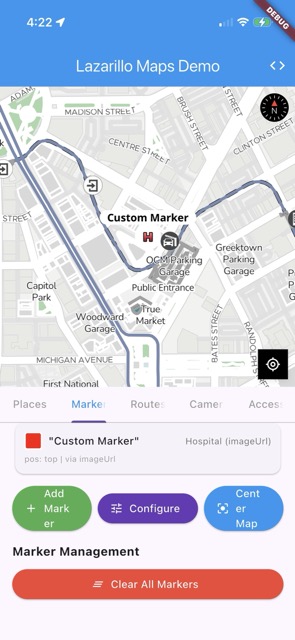
final logoMarker = LzAttributeMarker(
  'pin', // fallback icon
  const LatLng(-33.417733, -70.606573),
  title: 'Coffee Shop',
  imageUrl: 'https://example.com/logo.png',
  iconCornerRadius: -1, // circle on iOS
  imageSize: 30.0,
);
Draggable Marker
final draggableMarker = LzAttributeMarker(
  'pin',
  const LatLng(-33.417733, -70.606573),
  title: 'Drag Me',
  text: 'MOVABLE',
  textColor: '#FFFFFF',
  iconColor: '#4CAF50',
  draggable: true,
);
Error Handling
Future<void> addAttributeMarkerSafely() async {
  try {
    final marker = LzAttributeMarker(
      'pin',
      const LatLng(-33.417733, -70.606573),
      title: 'Safe Marker',
      subtitle: 'With error handling',
      text: 'SAFE',
      textColor: '#FFFFFF',
      iconColor: '#4CAF50',
      borderColor: '#2E7D32',
      textPosition: TextPosition.right,
    );

    await mapWidget!.addMarker(marker);
    print('Attribute marker added successfully');
  } catch (e) {
    print('Error adding marker: $e');
    ScaffoldMessenger.of(context).showSnackBar(
      SnackBar(content: Text('Error: $e')),
    );
  }
}
Important Notes
- Colors: Use hexadecimal format for colors (e.g., ‘#FF0000’)
- Text position: Text is positioned relative to the icon
- Available icons: Refer to the documentation for a list of available icons
- Performance: Markers with text may affect rendering performance
- Accessibility: Consider the contrast between text and background colors
Next Steps
- Basic Markers - Simple markers with icons
- Image URL Markers - Markers with remote images
- Marker Management - How to remove and manage markers
Last updated on