Place Marker with Logo Example
This example demonstrates how to create place markers that use the place’s logo instead of the default pin icon.
Overview
When adding markers for places, you can use the place’s logo by setting the imageUrl property on LzAttributeMarker. This provides a more visually appealing and informative marker experience.
Implementation
Flutter Code
void _addMarkerAtPlace(LzPlace place) {
  try {
    // Create a special marker for places using LzAttributeMarker with logo
    final marker = LzAttributeMarker(
      'pin', // Default icon fallback if no logo
      place.position,
      title: place.title,
      subtitle: place.category,
      imageUrl: place.logo, // Use the place's logo
      iconColor: '#2196F3', // Blue color for places
      borderColor: '#FFFFFF',
      text: place.title[0].toUpperCase(), // First letter as fallback
      textColor: '#FFFFFF',
      textPosition: TextPosition.top,
    );

    _service.lzMapWidget?.addMarker(marker);
    print('Place marker added at ${place.title} with logo: ${place.logo ?? 'no logo'}');
  } catch (e) {
    // Fallback to basic marker if logo fails
    try {
      final basicMarker = LzBasicMarker(
        'pin',
        place.position,
      );
      _service.lzMapWidget?.addMarker(basicMarker);
      print('Basic marker added at ${place.title}');
    } catch (e2) {
      print('Error adding marker: $e2');
    }
  }
}| Custom imageUrl marker | FlatIcon (Flutter) |
|---|---|
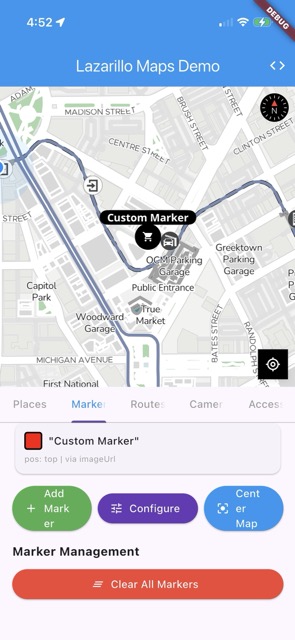 | 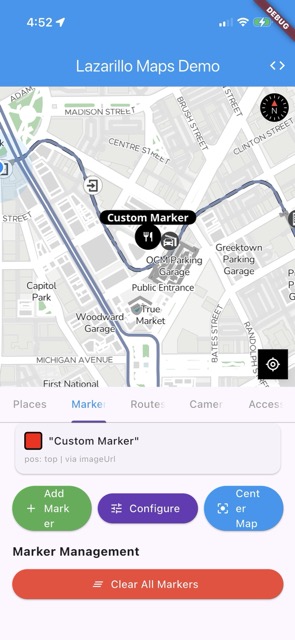 |
Features
Logo Support
- Automatic Logo Detection: The system automatically detects if a place has a logo
- Fallback Handling: If no logo is available, falls back to the default pin icon
- URL Support: Supports both HTTP/HTTPS URLs and local image references
Visual Styling
- Blue Color Scheme: Places use a distinctive blue color (
#2196F3) - White Border: Clean white border for better visibility
- Text Fallback: Shows the first letter of the place name if logo fails to load
Error Handling
- Graceful Degradation: If logo loading fails, automatically falls back to basic marker
- Debug Logging: Comprehensive logging for troubleshooting logo issues
Platform Support
Android
- Uses
LazarilloMarkerOptionsDTOto pass logo URL to native SDK - Supports both HTTP URLs and local image references
- Automatic fallback to default icon if logo fails
iOS
- Uses
LZAnnotationConfigurationBuilderwithsetImageUrl()orsetImageRef() - Intelligent detection of URL vs local reference
- Same fallback mechanism as Android
Usage Tips
- Logo Quality: Ensure logos are optimized for mobile display (recommended: 40x40px to 80x80px)
- URL Accessibility: Make sure logo URLs are publicly accessible
- Fallback Testing: Test with places that don’t have logos to ensure fallback works
- Performance: Consider caching logos locally for better performance
Example Output
When a place has a logo:
Place marker added at Starbucks with logo: https://example.com/starbucks-logo.pngWhen a place doesn’t have a logo:
Place marker added at Local Coffee Shop with logo: no logoTroubleshooting
Common Issues
- Logo not displaying: Check if the URL is accessible and returns a valid image
- Fallback not working: Ensure the default icon (‘pin’) is available in the SDK
- Performance issues: Consider implementing logo caching for frequently accessed places
Debug Information
The system provides detailed logging to help identify issues:
- Logo URL being used
- Fallback mechanisms being triggered
- Error messages for failed logo loads
Last updated on