FAQ
NPM install give me error
You can try using
or
Property "xxxxxxx" does not exist on type 'LazarilloMap' while you try to compile the demo
Probably the local version of your node_modules is outdated. You can try from lz-sdk directory the following:
npm run build #rebuild the current local version of the sdk

cd demoLZSDK/
rm -rvf node-modules #delete node module from demo app
npm i --legacy-peer-deeps # rebuild demo app
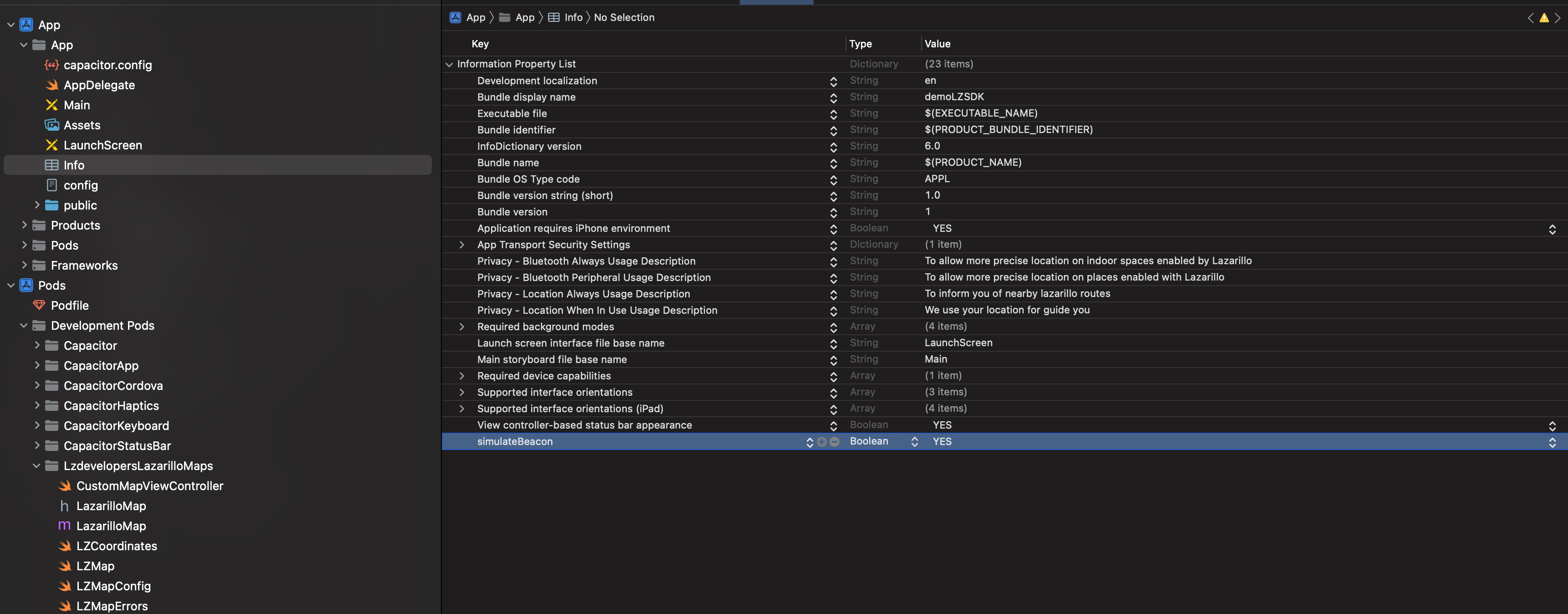
simulateBeacons() doesn't work on iOS but it does on Android
This may be due to the fact that the variable simulateBeacon was not added and is not defined in the file Info.plist
Location permission not working on iOS App
If you see this problem the first time you are using de SDK or the permission pop up doesn't show up you can try the following:
Go to the ios folder inside your app, then go to the AppDelegate.swift file and add the following lines:
import UIKit
import Capacitor
import CoreLocation
import CoreBluetooth

@UIApplicationMain
class AppDelegate: UIResponder, UIApplicationDelegate, CLLocationManagerDelegate {

    var window: UIWindow?
    private let locationManager = CLLocationManager()

    func application(_ application: UIApplication, didFinishLaunchingWithOptions launchOptions: [UIApplication.LaunchOptionsKey: Any]?) -> Bool {
        // Override point for customization after application launch.
        checkLocationPermission()
        return true
    }

    private func checkLocationPermission() {
        locationManager.delegate = self
        switch CLLocationManager.authorizationStatus() {
        case .notDetermined:
            locationManager.requestWhenInUseAuthorization()
        case .restricted, .denied:
            break
        case .authorizedAlways, .authorizedWhenInUse:
            break
        @unknown default:
            break
        }
    }
Last update:
2023-05-19