SDK interface
Main interface. This will declare the available contracts between the client and the plugin.
Documentation for the methods here.
initializeLazarilloPlugin(...)
initializeLazarilloPlugin(options: InitializeArgs) => Promise<void>
🚧 Wip: This method should be called before calling other methods available in this interface.
It will initialize the plugin and will be ready to use.
| Param |
Type |
Description |
options |
InitializeArgs |
Contains the apiKey param to use the plugin |
create(...)
create(options: CreateMapArgs, callback?: MapListenerCallback<MapReadyCallbackData> | undefined) => Promise<LazarilloMap>
✅ Create method. Iw till open the map on the space reserved for the html tag
Returns: Promise<LazarilloMap>
addRoute(...)
addRoute(options: AddRouteArgs) => Promise<RouteReadyCallbackData>
✅ Add a Lazarillo route to the map.
This method take care of asking for the route to the server and drawing it on the map, so you don't need to call
the drawRoute method.
It return the id of the route created and this could be used to start the routing with the method startRouting()
Returns: Promise<RouteReadyCallbackData>
startRouting(...)
startRouting(options: RouteConfig) => Promise<RouteReadyCallbackData>
🚧 Start the routing. It will be calculating the routing process and you could listen to the
location updates calling to the getCurrentPosition or watchPosition methods.
Permissions needed
Returns: Promise<RouteReadyCallbackData>
destroyRouting(...)
destroyRouting(options: RouteConfig) => Promise<void>
🚧 Stop the routing process. It will stop the location updates and also the route from the map.
drawRoute(...)
drawRoute(options: DrawRouteArgs) => Promise<RouteReadyCallbackData>
✅ Add a Lazarillo route to the map.
This method needs the route in json format
Returns: Promise<RouteReadyCallbackData>
enableClustering()
enableClustering() => Promise<void>
🚧 Wip
disableClustering()
disableClustering() => Promise<void>
🚧 Wip
addMarker(...)
addMarker(marker: Marker) => Promise<string>
✅ Add a marker to the map
Return a string representing the id of the marker added.
Returns: Promise<string>
addMarkers(...)
addMarkers(markers: Marker[]) => Promise<string[]>
✅ Add multiple markers to the map
Return an array of string representing the id of the markers added
| Param |
Type |
markers |
Marker[] |
Returns: Promise<string[]>
removeMarker(...)
removeMarker(id: string) => Promise<void>
✅ Remove a marker from the map
Use the id generated on addMarker or addMarkers
removeMarkers(...)
removeMarkers(ids: string[]) => Promise<void>
✅ Remove multiple markers from the map
Use the ids generated on addMarker or addMarkers
destroy()
destroy() => Promise<void>
✅ Force destroy of the map
setFloor(...)
setFloor(options: SetFloorArgs) => Promise<void>
✅ Change programmatically the floor
setCamera(...)
setCamera(config: CameraConfig) => Promise<void>
⚗️ Wip: It will animate the camera to the given location
setMapType(...)
setMapType(mapType: MapType) => Promise<void>
🚧 Wip
enableIndoorMaps(...)
enableIndoorMaps(enabled: boolean) => Promise<void>
🚧 Wip
| Param |
Type |
enabled |
boolean |
enableTrafficLayer(...)
enableTrafficLayer(enabled: boolean) => Promise<void>
🚧 Wip
| Param |
Type |
enabled |
boolean |
enableAccessibilityElements(...)
enableAccessibilityElements(enabled: boolean) => Promise<void>
🚧 Wip
| Param |
Type |
enabled |
boolean |
enableCurrentLocation(...)
enableCurrentLocation(enabled: boolean) => Promise<void>
🚧 Wip: This method will be in charge of ask for permissions and enable the current location.
It will show the user puck on the map.
Take into account that on Android, according to Google Play, you may add a dialog explaining why you need the permission before actually requesting it
Permissions needed
| Param |
Type |
enabled |
boolean |
getCurrentPosition(...)
getCurrentPosition(options?: PositionOptions | undefined) => Promise<GetPositionCallbackData>
🚧 Wip: Get the current location of the device
Permissions needed
Returns: Promise<GetPositionCallbackData>
setPadding(...)
setPadding(padding: MapPadding) => Promise<void>
🚧 Wip
watchPosition(...)
watchPosition(options?: PositionOptions | undefined, callback?: MapListenerCallback<GetPositionCallbackData> | undefined) => Promise<void>
🚧 Wip: Set up a watch for location changes. Note that watching for location changes
can consume a large amount of energy. Be smart about listening only when you need to.
Permissions needed
simulateBeacons(...)
simulateBeacons(options: SimulateBeaconsConf) => Promise<void>
🚧 Wip: Simulate beacons for testing purposes. The beacons id should be from the same place where the map will be created.
This beacons will override the result of the bluetooth scan.
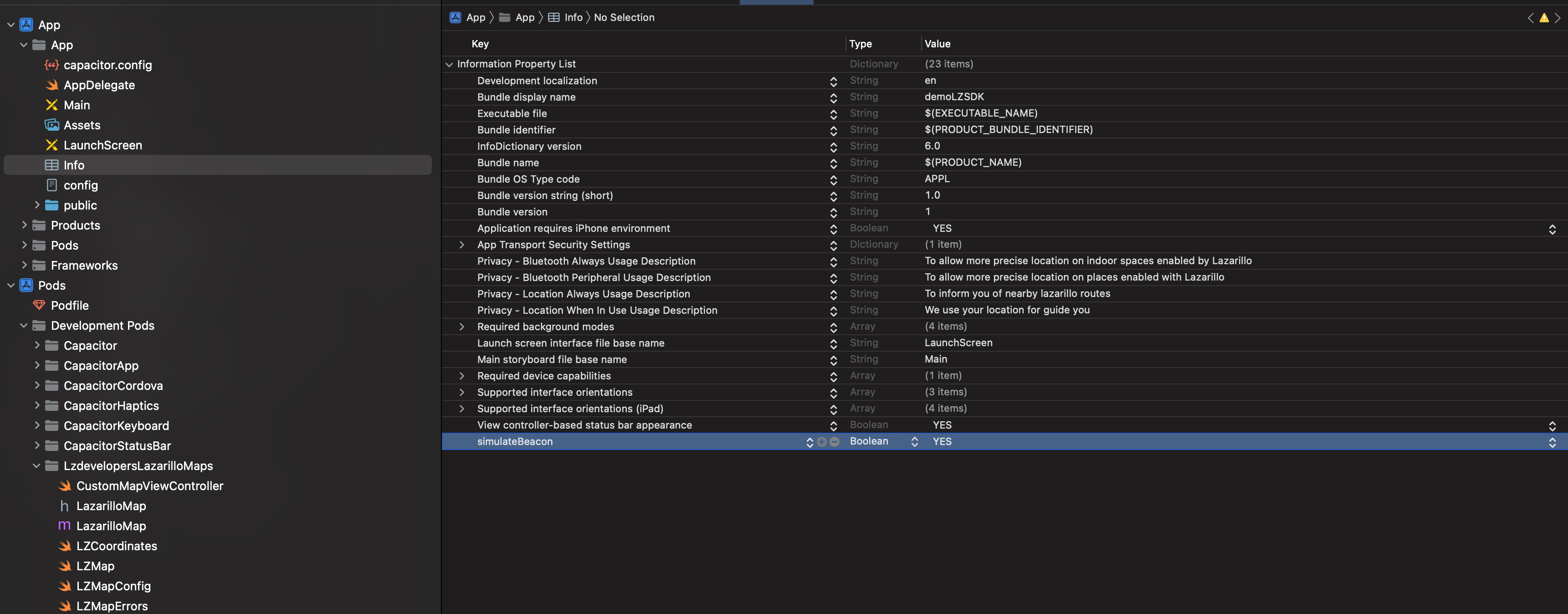
On iOS you need to add a boolean variable called simulateBeacon in the info.plist
setOnBoundsChangedListener(...)
setOnBoundsChangedListener(callback?: MapListenerCallback<CameraIdleCallbackData> | undefined) => Promise<void>
setOnCameraIdleListener(...)
setOnCameraIdleListener(callback?: MapListenerCallback<CameraIdleCallbackData> | undefined) => Promise<void>
setOnCameraMoveStartedListener(...)
setOnCameraMoveStartedListener(callback?: MapListenerCallback<CameraMoveStartedCallbackData> | undefined) => Promise<void>
setOnClusterClickListener(...)
setOnClusterClickListener(callback?: MapListenerCallback<ClusterClickCallbackData> | undefined) => Promise<void>
setOnClusterInfoWindowClickListener(...)
setOnClusterInfoWindowClickListener(callback?: MapListenerCallback<ClusterClickCallbackData> | undefined) => Promise<void>
setOnInfoWindowClickListener(...)
setOnInfoWindowClickListener(callback?: MapListenerCallback<MarkerClickCallbackData> | undefined) => Promise<void>
setOnMapClickListener(...)
setOnMapClickListener(callback?: MapListenerCallback<MapClickCallbackData> | undefined) => Promise<void>
setOnMarkerClickListener(...)
setOnMarkerClickListener(callback?: MapListenerCallback<MarkerClickCallbackData> | undefined) => Promise<void>
setOnMyLocationButtonClickListener(callback?: MapListenerCallback<MyLocationButtonClickCallbackData> | undefined) => Promise<void>
setOnMyLocationClickListener(...)
setOnMyLocationClickListener(callback?: MapListenerCallback<MapClickCallbackData> | undefined) => Promise<void>
clearSelectedPlace()
clearSelectedPlace() => Promise<void>
setTappedPlaceCallback(...)
setTappedPlaceCallback(callback?: MapListenerCallback<string | undefined> | undefined) => Promise<void>
colorPlaces(...)
colorPlaces(placeIds: string[]) => Promise<void>
| Param |
Type |
placeIds |
string[] |
getSubPLaces(...)
getSubPLaces(placeId?: string | undefined) => Promise<any>
| Param |
Type |
placeId |
string |
Returns: Promise<any>
getPublicPlace(...)
getPublicPlace(placeId: string, apiKey?: string | undefined) => Promise<any>
| Param |
Type |
placeId |
string |
apiKey |
string |
Returns: Promise<any>
getAvailablePlaces(...)
getAvailablePlaces(apiKey?: string | undefined) => Promise<any>
Returns: Promise<any>
setParentPlace(...)
setParentPlace(placeId: string) => Promise<void>
| Param |
Type |
placeId |
string |
addPlaceAnnotation(...)
Note: The method is currently available only on iOS.
addPlaceAnnotation(placeId: string): Promise<void>
Adds a visual annotation to a specific place on the map, using the place's id. The place must exist in the current map context.
| Param |
Type |
Description |
| placeId |
string |
The id of the place to annotate |
removePlaceAnnotation(...)
Note: The method is currently available only on iOS.
removePlaceAnnotation(placeId: string): Promise<void>
Removes the visual annotation from a specific place on the map, using the place's id.
| Param |
Type |
Description |
| placeId |
string |
The id of the place whose annotation is removed |
removeAllPlaceAnnotations(...)
Note: The method is currently available only on iOS.
Removes all place annotations from the current map.
removeAllPlaceAnnotations(): Promise<void>
Interfaces
InitializeArgs
Contains the api key needed to use the Lazarillo Maps SDK.
| Prop |
Type |
Description |
apiKey |
string |
The Lazarillo Maps SDK API Key. |
place |
string |
Id of the parent place. Need to be set before trying to get the location using the beacons |
CreateMapArgs
An interface containing the options used when creating a map.
| Prop |
Type |
Description |
Default |
id |
string |
An unique identifier for the map instance. |
|
apiKey |
string |
The Lazarillo Maps SDK API Key. |
|
config |
LazarilloMapConfig |
The initial configuration settings for the map. |
|
element |
HTMLElement |
The DOM element that the Lazarillo Map View will be mounted on which determines size and positioning. |
|
forceCreate |
boolean |
Destroy and re-create the map instance if a map with the supplied id already exists |
false |
LazarilloMapConfig
| Prop |
Type |
Description |
Default |
width |
number |
Override width for native map. |
|
height |
number |
Override height for native map. |
|
x |
number |
Override absolute x coordinate position for native map. |
|
y |
number |
Override absolute y coordinate position for native map. |
|
center |
LatLng |
Default location on the Earth towards which the camera points. |
|
zoom |
number |
Sets the zoom of the map. |
|
androidLiteMode |
boolean |
Enables image-based lite mode on Android. |
false |
devicePixelRatio |
number |
Override pixel ratio for native map. |
|
parentPlaceId |
string |
Unique identifier of the parent place, it will used to get the style of the map |
|
hideFloorSelector |
boolean |
A Boolean value that indicates whether the floor selector is hidden. |
true |
hideZoomIn |
boolean |
A Boolean value that indicates whether the zoomIn button is hidden. |
true |
hideZoomOut |
boolean |
A Boolean value that indicates whether the zoomOut button is hidden. |
true |
hideZoomToLocation |
boolean |
A Boolean value that indicates whether the zoomToLocation button is hidden. |
true |
compassIcon |
string |
The icon used for the compass that appear on the right top corner of the map pointing to the north. It should be a valid url, otherwise the default icon will be used. The image should be oriented to the north at the top. |
|
locationIcon |
string |
The icon of the user position. This will be used when the phone has no compass sensor. It should be a valid url, otherwise the default icon will be used. |
|
locationIconWithBearing |
string |
The icon of the user position with bearing. This will be used when the phone has a compass sensor. It should be a valid url, otherwise the default icon will be used. |
|
maxZoom |
number |
Max zoom that map could set. |
22.0 |
minZoom |
number |
Min zoom that map could set. |
0.0 |
showCompass |
boolean |
Extra flag for show or hide compass on map |
true |
boundRadius |
number |
Set bounds using map elements and adding an extra padding. Should use values >= 0 for use bounds. |
-1 |
LatLng
An interface representing a pair of latitude and longitude coordinates.
| Prop |
Type |
Description |
lat |
number |
Coordinate latitude, in degrees. This value is in the range [-90, 90]. |
lng |
number |
Coordinate longitude, in degrees. This value is in the range [-180, 180]. |
MapReadyCallbackData
| Prop |
Type |
mapId |
string |
error |
string |
RouteReadyCallbackData
SdkRoute
Interface for hold the data of a route
| Prop |
Type |
Description |
legs |
SdkLegRoute[] |
Here are the legs of the route. Most routes need only one leg, but some may need more. |
overview_polyline |
Polyline |
The polyline encoded that describes the route. |
SdkLegRoute
| Prop |
Type |
Description |
distance |
{ value: number; } |
The distance covered by this leg. Most routes need only one leg, but some may need more. |
duration |
{ value: number; } |
The typical time required to perform the leg, until the next leg. |
end_address |
string | null |
The address of the starting point of this leg. |
end_location |
{ lat: number; lng: number; } |
The location of the starting point of this leg. |
start_address |
string | null |
The address of the starting point of this leg. |
start_location |
{ lat: number; lng: number; } |
The location of the starting point of this leg. |
steps |
SdkStepRoute[] |
The steps of the leg. |
last_step |
SdkStepRoute | null |
In some cases, we need to add a last step to the route because the en place has no beacon accessibility |
SdkStepRoute
| Prop |
Type |
Description |
distance |
{ value: number; } |
The distance covered by this step until the next step. |
duration |
{ value: number; } |
The typical time required to perform the step, until the next step. |
start_location |
{ lat: number; lng: number; } |
The location of the starting point of this step. |
end_location |
{ lat: number; lng: number; } |
The location of the last point of this step. |
start_inside_place |
string | null |
The id of the place at the start of this step. |
start_inside_floor |
string | null |
The id of the floor at the start of this step. |
end_inside_place |
string | null |
The id of the place at the end of this step. |
end_inside_floor |
string | null |
The id of the floor at the end of this step. |
html_instructions |
string |
The instructions for this step, presented as an HTML text string. If you want a clean text, use plain_instructions instead. |
travel_mode |
string |
The mode of travel for this step. |
polyline |
Polyline |
The polyline encoding of this step. |
maneuver |
string | null |
The maneuver for this step. For example 'turn-left'. |
elevator_step |
boolean | null |
If the step occurs in an elevator, this field will be true. If the step is not in an elevator, this field will be false or undefined. |
auto_generated_message |
boolean | null |
If the step is an auto-generated message, this field will be true. |
plain_instructions |
string |
The instructions for this step, presented as a plain text string. |
Polyline
| Prop |
Type |
Description |
points |
string |
The encoded polyline points. |
points_lat_lng |
{ lat: number; lng: number; }[] | null |
The decoded polyline points. |
overview_points |
{ lat: number; lng: number; }[] | null |
The decoded polyline points. |
AddRouteArgs
| Prop |
Type |
Description |
mapId |
string |
An unique identifier for the map instance. |
RouteConfig
DrawRouteArgs
Interface for passing arguments to the sdk in order to paint the route
JSON
An intrinsic object that provides functions to convert JavaScript values to and from the JavaScript Object Notation (JSON) format.
| Method |
Signature |
Description |
| parse |
(text: string, reviver?: ((this: any, key: string, value: any) => any) | undefined) => any |
Converts a JavaScript Object Notation (JSON) string into an object. |
| stringify |
(value: any, replacer?: ((this: any, key: string, value: any) => any) | undefined, space?: string | number | undefined) => string |
Converts a JavaScript value to a JavaScript Object Notation (JSON) string. |
| stringify |
(value: any, replacer?: (string | number)[] | null | undefined, space?: string | number | undefined) => string |
Converts a JavaScript value to a JavaScript Object Notation (JSON) string. |
SolidStyle
It will paint the line with a solid color.
This is the default type.
| Prop |
Type |
Description |
color |
string |
Color of the line in hexadecimal format. For example: "#FF0000" |
GradientStyle
It will paint the line with a gradient of colors
| Prop |
Type |
Description |
colors |
string[] |
It will receive an array of colors in hexadecimal format. For example: ["#FF0000", "#00FF00", "#0000FF"] |
positions |
number[] |
Optional: It will receive an array of numbers between 0 and 1. Indicating the position of each color in the progression of the gradient. This array must have the same length as the colors array. Otherwise, an exception will be thrown. For example: [0, 0.5, 1] If not provided, the colors will be distributed as space-between. |
Marker
A marker is an icon placed at a particular point on the map's surface.
| Prop |
Type |
Description |
Default |
coordinate |
LatLng |
Marker position |
|
opacity |
number |
Sets the opacity of the marker, between 0 (completely transparent) and 1 inclusive. |
1 |
title |
string |
Title, a short description of the overlay. |
|
snippet |
string |
Snippet text, shown beneath the title in the info window when selected. |
|
icon |
string |
Marker icon to render. You can use a icon from LazarilloIcons, this would improve performance but you also have the option to pass an url |
|
floorId |
string |
If floor id is passed, the marker will only show itself when the floor is visible. Keep this field empty if the marker is outdoor |
|
text |
string |
If text is passed, the marker will show a text label. |
|
iconColor |
string |
If iconColor is passed, the color of the icon passed will change to this value in hex. |
|
textColor |
string |
If textColor is passed, the color of the text passed will change to this value in hex. |
|
borderColor |
string |
If borderColor is passed, the color of the border passed will change to this value in hex. |
|
SetFloorArgs
| Prop |
Type |
mapId |
string |
floorId |
string |
CameraConfig
Configuration properties for a Lazarillo Map Camera
| Prop |
Type |
Description |
Default |
coordinate |
LatLng |
Location on the Earth towards which the camera points. |
|
zoom |
number |
Sets the zoom of the map. |
|
bearing |
number |
Bearing of the camera, in degrees clockwise from true north. |
0 |
angle |
number |
The angle, in degrees, of the camera from the nadir (directly facing the Earth). The only allowed values are 0 and 45. |
0 |
animate |
boolean |
Animate the transition to the new Camera properties. |
false |
animationDuration |
number |
The duration of the animation in milliseconds. This must be strictly positive and entire, otherwise an exception will be thrown. |
1000 |
GetPositionCallbackData
| Prop |
Type |
location |
LzLocation |
routingStatus |
RoutingStatus |
insideBuilding |
'INSIDE' | 'OUTSIDE' | 'MAYBE_INSIDE' | 'UNKNOWN' |
LzLocation
An interface that represent a location from Lazarillo
| Prop |
Type |
Description |
building |
string | null |
|
floor |
string | null |
|
polygons |
any |
|
latitude |
number |
|
longitude |
number |
|
heading |
number |
Heading in degrees clockwise from North. This value is in the range [0, 360). |
RoutingStatus
| Prop |
Type |
status |
'ON_ROUTE' | 'OUT_OF_ROUTE' | 'FINISHED' | 'NO_ROUTE' |
currentStep |
number |
MapPadding
Controls for setting padding on the 'visible' region of the view.
| Prop |
Type |
top |
number |
left |
number |
right |
number |
bottom |
number |
SimulateBeaconsConf
Interface used to pass beacons to simulate.
| Prop |
Type |
simulateBeacons |
string |
CameraIdleCallbackData
| Prop |
Type |
mapId |
string |
bounds |
LatLngBounds |
bearing |
number |
latitude |
number |
longitude |
number |
tilt |
number |
zoom |
number |
LatLngBounds
An interface representing the viewport latitude and longitude bounds.
CameraMoveStartedCallbackData
| Prop |
Type |
mapId |
string |
isGesture |
boolean |
ClusterClickCallbackData
| Prop |
Type |
mapId |
string |
latitude |
number |
longitude |
number |
size |
number |
items |
MarkerCallbackData[] |
MarkerCallbackData
| Prop |
Type |
markerId |
string |
latitude |
number |
longitude |
number |
title |
string |
snippet |
string |
MarkerClickCallbackData
MapClickCallbackData
| Prop |
Type |
mapId |
string |
latitude |
number |
longitude |
number |
Type Aliases
MapListenerCallback
The callback function to be called when map events are emitted.
(data: T): void
Enums
MapType
| Members |
Value |
Description |
Normal |
'Normal' |
Basic map. |
Hybrid |
'Hybrid' |
Satellite imagery with roads and labels. |
Satellite |
'Satellite' |
Satellite imagery with no labels. |
Terrain |
'Terrain' |
Topographic data. |
None |
'None' |
No base map tiles. |
Last update:
2025-07-22