Permissions
iOS
The Lazarillo Maps SDK supports the use of showing the users current location via enableCurrentLocation(bool). To use this, Apple requires:
Privacy descriptions to be specified in Info.plist:
NSLocationAlwaysUsageDescription(Privacy - Location Always Usage Description)NSLocationWhenInUseUsageDescription(Privacy - Location When In Use Usage Description)NSBluetoothAlwaysUsageDescription(Privacy - Bluetooth Always Usage Description)NSBluetoothPeripheralUsageDescription(Privacy - Bluetooth Peripheral Usage Description)NSMotionUsageDescription(Privacy - Motion Usage Description)
Specify the next background modes:
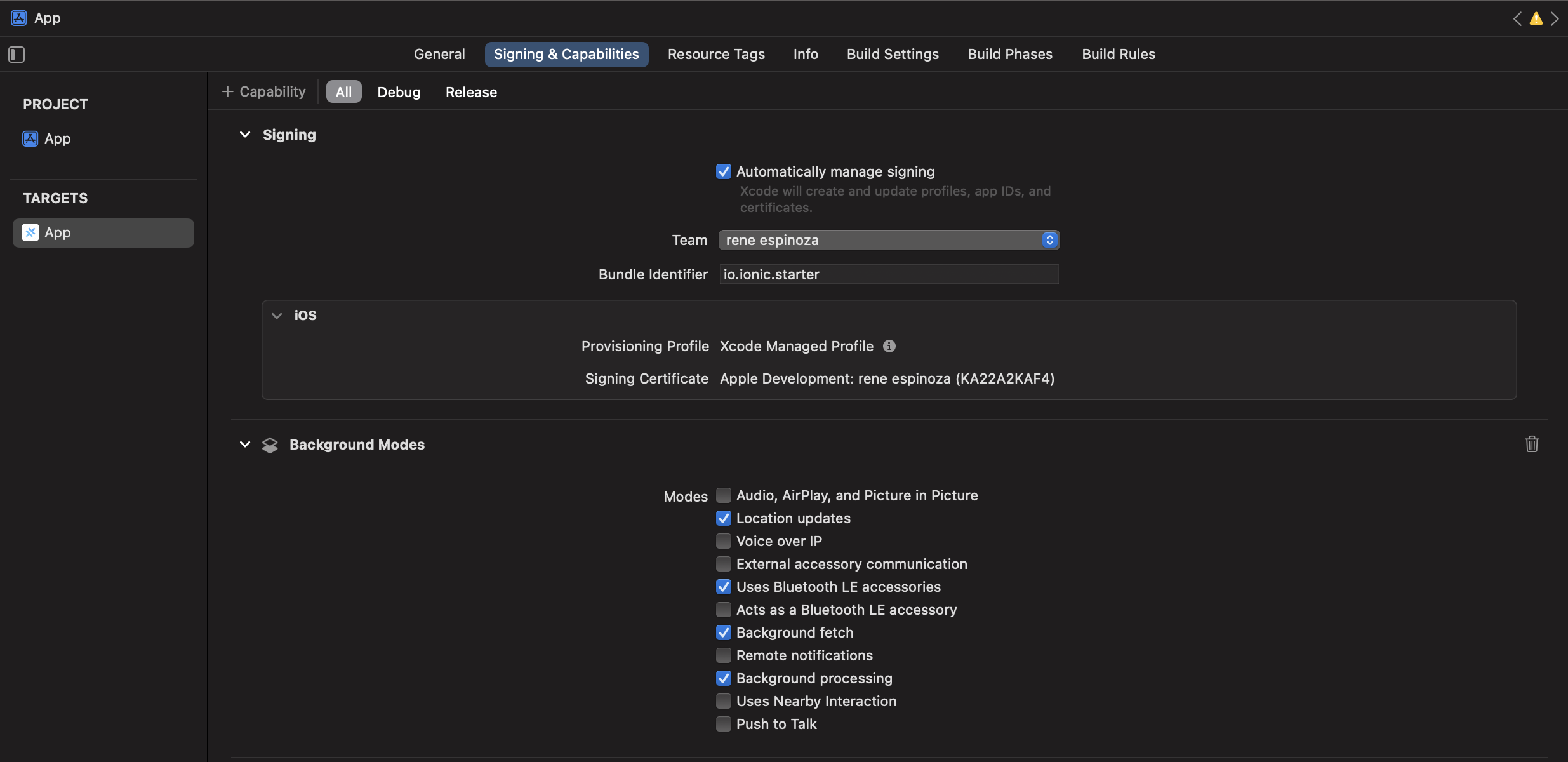
Read about Configuring Info.plist in the iOS Guide for more information on setting iOS permissions in Xcode.
All the information to request authorization to use location services on iOS, is specified here.
In order to use the SDK with location, it´s not strictly necessary to use "Always allow", with only "Allow while using" should be enough for foreground location tracking.
In order to improve the user location, it´s add Privacy - Motion Usage Description for only update location when user is motion. This permission can be declined and not affect the operation.here
Edit Main.storyboard
On iOS a little extra step should be done.
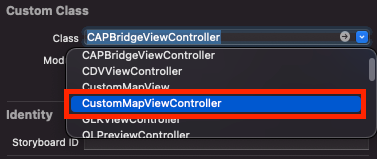
Select the Main.storyboard file in the Project Navigator, select the Bridge View Controller in the Bridge View Controller Scene, select the Identity Inspector on the right.
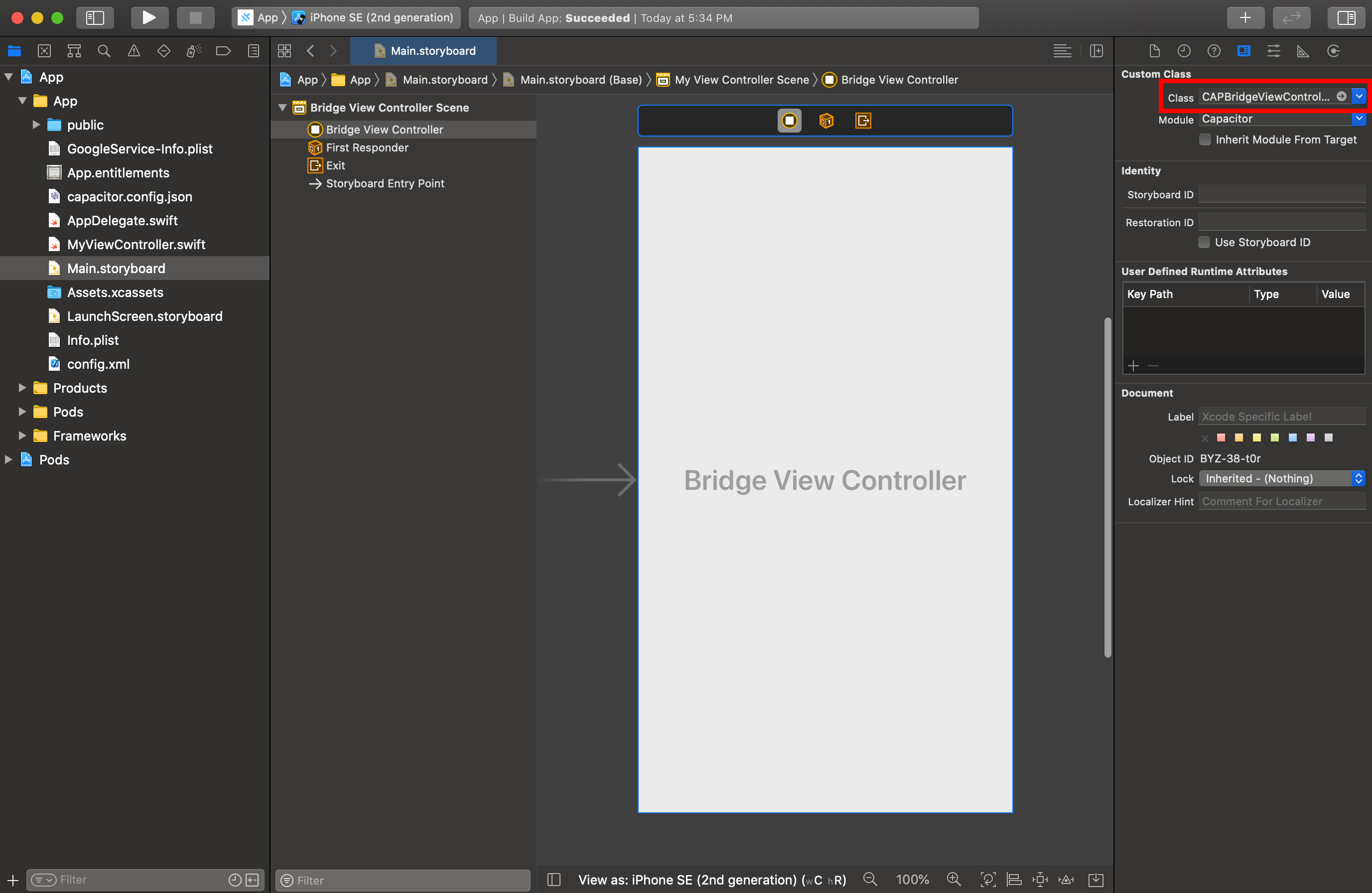
Finally, select CustomMapViewController from the dropdown under Custom Class.
Android
The Lazarillo Maps SDK for Android requires you to add your API key to the AndroidManifest.xml file in your project.
To use certain location features, the SDK requires the following permissions to also be added to your AndroidManifest.xml:
<!-- Needed for active routing -->
<uses-permission android:name="android.permission.ACCESS_COARSE_LOCATION" />
<uses-permission android:name="android.permission.ACCESS_FINE_LOCATION" />


<!-- Optional if targeting devices <30: request legacy Bluetooth permissions on older devices. -->
<uses-permission android:name="android.permission.BLUETOOTH"
android:maxSdkVersion="30" />
<uses-permission android:name="android.permission.BLUETOOTH_ADMIN"
android:maxSdkVersion="30" />

<!-- Needed to compute location. -->
<uses-permission android:name="android.permission.BLUETOOTH_CONNECT" />
<uses-permission android:name="android.permission.BLUETOOTH_SCAN" />

<uses-permission android:name="android.permission.ACTIVITY_RECOGNITION"/>
This information about permissions can be found here, bluetooth specific information is here. There you can find information about supporting different Android versions and different bluetooth versions.
Generally speaking, using the permission "Allowing only while the app is in use" for location services should be enough in order to use the SDK in foreground.